
Useful tips
Internet backup: how to connect during a blackout


Internet backup power has become a basic need for homes, apartments, offices and small businesses, especially during power outages. When the power goes out, the router, ONU terminal, switch, and sometimes the entire home network often stop working. As a result, there is no connection, working services do not open, calls are interrupted, video surveillance and the "smart home" stop. That is why it is worth thinking in advance how to organize fiber optic internet without electricity and not be left without communication at the most inopportune moment.
The problem is that the mere presence of fiber optic does not guarantee internet during a blackout. The line from the provider may be working, but on the subscriber's side everything stops due to the lack of power for the active equipment. Most often, it is enough to choose the right DBJ for router or mini ups for onu, to provide several hours of battery life. But the choice must be technically sound: incorrect voltage, weak battery, or connection errors can not only disconnect the network, but also damage the equipment.
Why does the internet disappear when the power goes out?
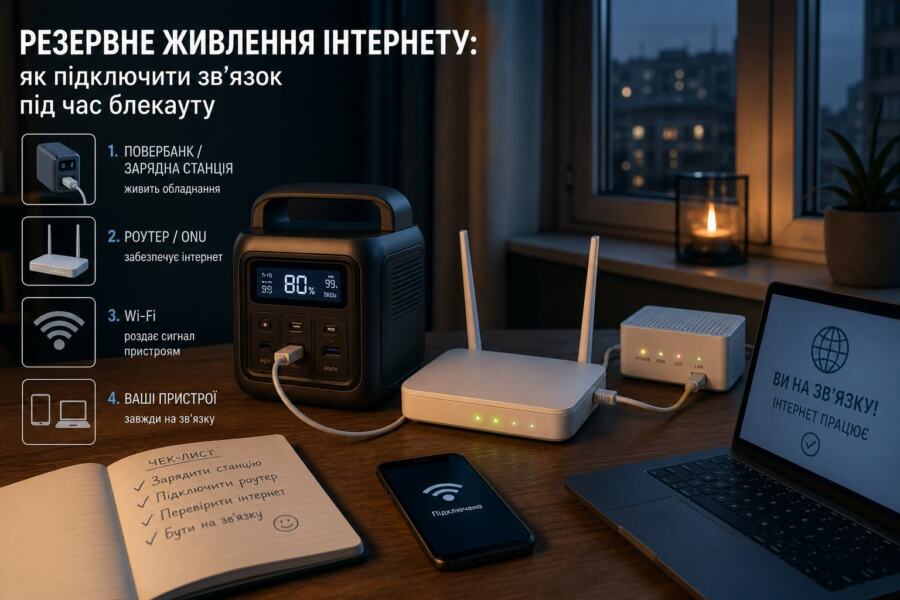
To understand how it works internet backup power, it is important to know what elements a home connection consists of. A typical network includes:
- ONU / ONT terminal — receives an optical signal from the provider and converts it into Ethernet;
- router — distributes Internet to devices via Wi-Fi or cable;
- switch or media converter — sometimes present in more complex schemes;
- provider power — equipment on network nodes, which can also be disconnected.
If the power goes out only in the apartment, and the provider has a reserve, then it is enough to power up your own router and ONU. If there is no electricity on the provider's side as well, then even a perfectly configured DBJ for router will not help, because the “base” of the network may also be out of power. That is why before purchasing equipment, it is worth checking whether the provider has backup power on the main line and in the house.
Fiber-optic internet has one important advantage: in most cases, the line itself is resistant to power outages, because there is no power in the cable. The problem is only in the active devices at the ends of the line. Therefore fiber optic internet without electricity It is quite real, but only if you provide power to your own access node.
What exactly needs to be powered for the internet to work?
In most apartments and private houses, you don't need to reserve the entire house, but only a few compact devices. Most often, these are:
- ONU terminal from the provider.
- Wi-Fi router.
- If necessary — switchboard, IP camera, mini-settop box or media converter.
In practice, the consumption is very small. For example, a typical router may take 6–12 W, and ONU — yet 4–8 W. Together it is only 10–20 W, which is much less than any kettle or microwave. That is why you don't need a large power station to back up your internet - a compact one is enough. mini ups for onu or a small uninterruptible power supply.
But there is a nuance: not all devices are powered by the same voltage. Some operate from 12 V, others - from 9 V, the third - from 5V via USB. If you enter the wrong parameters, you can get unstable operation or even burned out equipment. Therefore, the main rule is not to buy a backup power supply “by eye”, but to check the label on the power supply of each device.
What are the options for backup internet power?
For the organization internet backup power use several solutions, and each has its own pros and cons.
- Mini UPS for ONU and router — a compact solution for 1–3 devices, convenient for an apartment.
- UPS for router — a specialized or regular UPS that supports network equipment.
- Power bank with UPS function — sometimes suitable for 5V devices, but not always stable.
- Battery system with inverter — an option for longer backup and more devices.
- Mini-power plant — convenient for powering not only the Internet, but also lighting, a laptop, and chargers.
For most everyday scenarios, it works best to mini ups for onu or small dbj for router. It is compact, quiet, economical and does not require complicated installation. If you need autonomy for many hours, then you should look at battery stations or inverter-based solutions.
Mini UPS for ONU: When is it the best choice?
Mini UPS for ONU — is a small backup power source that automatically switches to the battery when the 220 V network disappears. Its main advantage is simplicity. The device is placed between the power supply and the terminal, and sometimes also between the power supply and the router, if the output voltages match.
Typical characteristics of such models:
- Entrance 5 V, 9 V, 12 V or combination ports;
- battery capacity from several thousand mAh to tens of Wh;
- automatic switching without rebooting the equipment;
- overload and short circuit protection.
The advantage of a mini UPS is that it doesn't take up much space, doesn't make a noise, doesn't require a separate room, and can keep the network alive even in a small apartment. For the scenario of "communication, instant messengers, calls, work VPN, payment terminal," this is often quite enough.
But there are also limitations. Mini UPS for ONU should not be considered as a universal solution for the whole house. It is not designed for heavy loads, and the autonomy margin depends on the consumption of connected devices. If the router, ONU, camera and several access points together consume a lot of watts, the operating time will be significantly reduced.
UPS for a router: how is it different from a regular UPS
UPS for router — this is either a specialized mini UPS, or a classic uninterruptible power supply adapted for network equipment. A regular computer UPS can also be used, but it is not always optimal. It is larger, noisier, often has its own consumption and is not always effective for small loads.
A specialized solution is better because:
- works with 12 V or other required voltages without unnecessary conversions;
- has compact dimensions;
- better suited for routers, ONUs and modems;
- often has DC outputs, not just 220V.
A regular UPS is appropriate if you need to power not only the router, but also several other devices from 220 V: for example, an optical terminal through its standard power supply, a switch, a laptop or charger. But it should be borne in mind that at very low loads, some UPSs do not work perfectly, and the battery may age faster due to incorrect operating conditions.
For a home or apartment where the main goal is to stay connected for a few hours, DBJ for router in DC format, a solution is usually more practical than a large office UPS.
How to choose the right Internet backup power supply
For the system to work stably, you need to go through several steps and not rely only on marketing figures.
- Check the voltage of each device. Look at the adapters of the ONU, router, switch. It is indicated there whether it is 5 V, 9 V, 12 V, as well as the current in amperes.
- Calculate the total consumption. To do this, simply add up the power in watts or multiply the voltage by the current.
- Determine your desired battery life. 1 hour, 3 hours, 8 hours are completely different tasks.
- Select a reserve type. Mini UPS, dedicated UPS, inverter with battery or power station.
- Check connector compatibility. Plug size matters just as much as voltage.
The most common mistake is to buy a device labeled “for a router” without looking at the output voltage. For example, if the ONU operates from 12 V, and the mini UPS has only 9 V at the output, the system will either not start or will work intermittently. Another common problem is to mix up the polarity of the plug. For DC equipment, this is critical.
Below is a simplified table for guidance.
| Device | Typical voltage | Consumption | What will work? |
|---|---|---|---|
| Wi-Fi router | 9 V / 12 V | 6–12 W | Mini UPS, DC UPS |
| ONU / ONT | 12 V | 4–8 W | Mini UPS for ONU, DC UPS |
| Switchboard | 5 V / 12 V | 3–15 W | UPS or mini UPS with appropriate output |
| One or two devices | Depending on the model | up to 20 W | Compact mini UPS |
How long will the internet work on backup power?
The duration of operation depends on the battery capacity and equipment consumption. A very rough guide is as follows: if the ONU and router together consume 15 W, then the battery is 30 Wh will give about two hours of operation, taking into account losses. If the capacity is larger, the autonomy time will also increase.
But don't blindly believe advertising promises. The manufacturer may indicate the operating time under ideal conditions, without taking into account real losses due to voltage conversion, temperature and battery wear. This is especially important for mini ups for onu, where compactness is often achieved at the expense of a small battery.
For practice, it is convenient to calculate as follows:
- up to 1 hour — minimum reserve for short interruptions;
- 2–4 hours — a good homemade option;
- 6+ hours — a system with a larger battery or inverter is already needed;
- daily autonomy — this is a separate power system, not a regular mini UPS.
How to connect a router and ONU without errors
Connecting a backup for the Internet is usually simple, but this is where people often make mistakes. To avoid problems, follow this simple logic:
- First, determine which devices will be under reserve.
- Check their voltage and polarity.
- Connect the power supply to the UPS or mini UPS input.
- From the output of the backup source, supply power to the router or ONU.
- Make sure that the network does not reboot when the 220 V power disappears.
If the device restarts when switched to battery after connecting, it means that the backup source cannot handle the peak current or has too slow switching. This is bad for the Internet, because even a short restart interrupts a video call, online work, or alarm.
It is also worth checking whether the equipment is overheating. In a small cabinet, near a battery, or in a closed niche, the temperature can rise, which reduces the battery life. Excessive heat — one of the main enemies of any backup power supply.