
Useful tips
Mini UPS for router: how long does it work during a power outage


Mini UPS for a router has long been one of the most practical solutions for home Internet during power outages. When the electricity goes out, and with it Wi-Fi, the first thought is not comfort, but communication: work, study, video calls, banking services, cameras, alarm systems. That's why router backup power has turned from a “useful option” into a real need.
Most often, users are interested in a simple question: how many hours does he work mini UPS for the router and whether it will last the entire blackout. The answer depends not only on the battery capacity, but also on your equipment consumption, voltage, power conversion, and whether you are powering only the router, or also an ONU/GPON terminal, camera, or modem.
What is a Mini UPS and why is it suitable for a router?
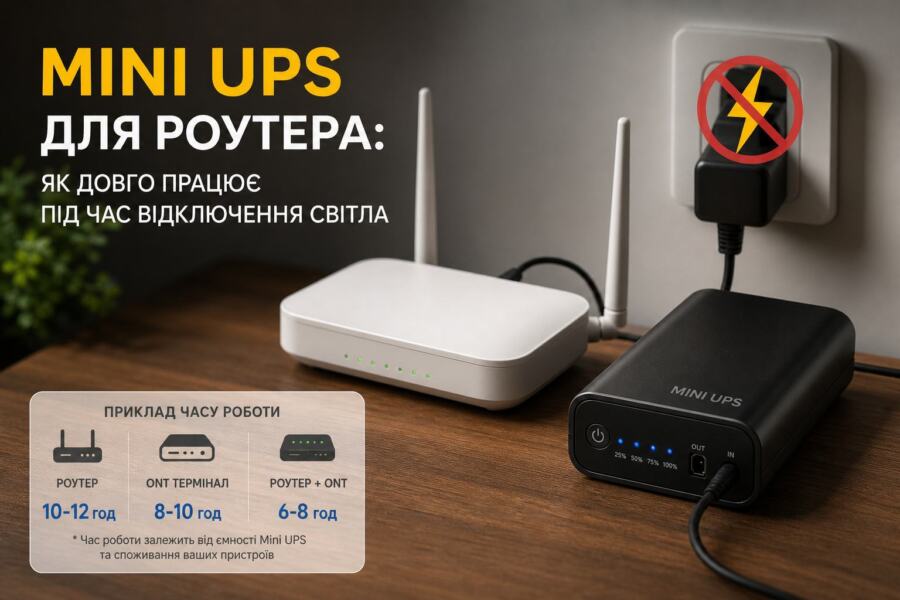
Mini UPS is a compact uninterruptible power supply with a battery that automatically takes over the load when the 220 V network disappears. In practice, this means that the router does not reboot, the Internet does not disconnect, and you may not even notice the moment of switching to the battery.
Unlike a large office UPS, DBJ for router usually works with low voltage devices: 9 V, 12 V, sometimes 5 V via USB. This makes it compact, economical and convenient for home use. Most models have outputs for different voltages, as well as protection against overload, short circuit and deep discharge.
For internet equipment, this format is often preferable to a classic inverter with a large battery if you only need to power a few low-power devices. That's why router backup power in Mini UPS format has become a popular solution in apartments, private homes, shops and small offices.
What does UPS autonomy depend on?
Question UPS autonomy There is no universal answer, because the operating time is determined not only by the number on the case. Even if it is written mini ups 20000mah, the actual duration of work depends on many technical nuances.
The main factors are as follows:
- Battery capacity — the larger it is, the longer the device works, but it's not just the mAh number that matters.
- Router consumption — a simple home router can consume 5–8 W, and a powerful Wi-Fi mesh or ONU kit can consume more.
- Supply voltage — at 12 V the current is lower than at 5 V for the same power.
- Converter efficiency — some energy is lost during voltage conversion.
- Operating temperature — the battery performs worse in cold and heat.
- Battery status — old batteries last noticeably less.
Therefore, the marketing “up to 10 hours” on the box often does not coincide with reality. If the device is powered by only one router, this is still possible. However, if a router, an optical terminal and an IP camera are connected, the operating time can be halved or even tripled.
How to calculate the operating time of a Mini UPS for a router
To understand the real UPS autonomy, you need to look at the energy reserve in watt-hours, not just mAh. This is important because capacity mini ups 20000mah is usually indicated for internal lithium cells at a voltage of 3.7 V, and the router operates, for example, from 12 V. That is, simple arithmetic “20,000 mAh = very long” does not work here.
The simplified calculation looks like this:
Energy (Wh) = Capacity (Ah) × Battery Voltage (V)
For example, 20000 mAh battery = 20Ah. If the internal voltage of the element 3.7 V, then:
20 Ah × 3.7 V = 74 Wh
But some of the energy is lost in the conversion, so the usefully available energy may be approximately 60–65Wh. Next, we divide by equipment consumption.
If the router consumes 6 W:
60 Wh / 6 W = 10 hours theoretically.
In reality, it is better to stock up and wait. 7–9 hours, if there are no additional loads and the battery is in good condition. If the consumption 10 W, the time will be reduced to approximately 5–6 hours.
Examples of real autonomy for different scenarios
For clarity, the following are approximate values. They are not absolute, but they are a good indication of what to expect from DBJ for router in everyday life.
| Equipment | Average consumption | Mini UPS 10000 mAh | Mini UPS 20000 mAh |
|---|---|---|---|
| One simple router | 5–6 W | 2.5–4 hours | 5–9 hours |
| Router + ONU/GPON | 10–12 W | 1.5–2.5 hours | 3–5 hours |
| Router + ONU + camera | 14–18 W | 1–1.5 hours | 2–3.5 hours |
| Powerful mesh router | 12–20 W | 1–2 hours | 2.5–4 hours |
This is just a guideline, but it illustrates the main rule well: the lower the load, the longer the mini UPS works. That is why it is worth checking the rated power of your equipment before purchasing, and not just focusing on advertising figures.
How to find out how much your router consumes
To choose the right one router backup power, you need to know the actual consumption. It can be determined in several ways:
- Look at the power supply: the output voltage and current are indicated there, for example 12 V 1 A. Theoretically, this is up to 12 W, but actual consumption is often less.
- Check the technical documentation of the router or ONU.
- Measure consumption with a wattmeter or smart outlet with power metering.
It is best to focus on the actual measurements. For example, the adapter says 12 V 1 A, but the router in normal mode can only consume 5.8 W. And this significantly affects UPS autonomy.
A typical mistake is to take a stock “with your head” and buy a unit that is too weak, which cannot handle the connected equipment. Another mistake is to connect devices for which it is not designed, such as a TV, laptop or boiler, through a Mini UPS. This is a different category of backup power.
Which Mini UPS to choose: what to look for before buying
Not everyone mini ups 20000mah equally suitable for your power scheme. Before buying, check not only the capacity, but also other parameters.
Key features:
- Output voltage: most often needed 5 V, 9 V or 12 V.
- Maximum current: it is important that there is enough for all connected equipment.
- Number of outputs: separate ports for router, ONU and USB.
- Battery type: lithium-ion or lithium iron phosphate in more expensive models.
- Availability of through-power supply: the device simultaneously charges and powers the equipment.
- Protect: from short circuit, overvoltage, overheating and overdischarge.
If you only need a simple DBJ for router, it is better to take a model with a small power margin. If you also plan to connect an optical terminal, choose an option with two or three outputs and sufficient current on each line.
Practical advice: before buying, check not only the connector, but also the polarity. Most routers use a “plus in the center”, but there are exceptions. An error with the polarity can damage the equipment.
Mini UPS, power bank or classic UPS: which is better?
For short outages, a Mini UPS is almost always more convenient than a regular power bank. The reason is simple: a power bank does not always work correctly in pass-through mode, can shut down at low current, and also requires a separate voltage converter.
Mini UPS wins in the following situations:
- need to provide continuous operation of the router without reboots;
- compactness and easy connection are important;
- stable voltage is needed 9 V or 12 V;
- The equipment operates on low power.
A classic large UPS is better suited if you need to power not only Internet equipment, but also a PC, monitor, NAS, or other 220 V equipment. But for one or two devices, it is often too bulky, noisy, and uneconomical.
Therefore, for an apartment or a private house router backup power because Mini UPS is often the most practical option.
Common Mistakes When Using a Mini UPS
Even a good device won't save you if you use it incorrectly. Here are the most common mistakes:
- Connecting too powerful a load. If the total consumption is higher than the UPS's capabilities, autonomy drops sharply, and the device may go into protection mode.
- Ignoring voltage. Router on 12 V cannot be powered by the output 9 V, unless otherwise specified by the manufacturer.
- Using poor quality cables. Cheap thin cable causes voltage drops, heating and instability.
- Constant overheating. If the Mini UPS is in a closed cabinet without ventilation, the battery ages faster.
- Incorrect time calculation. Users often expect 10–12 hours of operation, although they actually get 3–5 hours due to high consumption.
It is worth mentioning another typical problem separately: connecting several devices to the Mini UPS at once without checking the total current. If DBJ for router is designed for 2 A, and you try to supply it with 2.5 A or more, everything will work unstable or the device will simply turn off.
How to increase uptime without replacing equipment
It is not always necessary to buy a larger battery. Often, reducing consumption is enough to UPS autonomy became noticeably better.
Practical ways:
- Power only critical devices — router and ONU, without unnecessary cameras or amplifiers.
- Turn off USB devices, if they are not needed during a blackout.
- Update your router for a more energy-efficient model if your old device consumes too much.
- Do not expose the UPS to heat. — the battery lasts longer at normal temperature.
- Check your real-time uptime every few months., to notice battery degradation in time.
For example, if your router and ONU together consume 14 W, and Mini UPS only gives 4 hours, you can try replacing some of the connections, removing unnecessary peripherals, or switching to a model with a larger power reserve. Sometimes such small optimizations add 1–2 hours without any battery replacement.
What to pay attention to during installation and connection
Connecting a Mini UPS is not complicated (Incomplete: max_output_tokens)