
Useful tips
How to choose a reliable video surveillance system to protect your home and business


Modern cameras allow you to monitor an object in real time from your smartphone screen, wherever you are. We tell you how to choose video surveillance system, which will cover your needs without unnecessary costs.
What tasks does video surveillance solve?
Installing cameras on a site usually serves three practical purposes:
- Crime prevention: Most attackers avoid homes and offices with visible cameras — it's a psychological barrier that filters out up to 80% threats.
- Remote control: You always know when the children are back from school, how the staff is working in the warehouse, or what is happening at the dacha during your absence.
- Evidence collection: If an incident does occur, you receive detailed high-resolution video (Full HD or 4K) that will help establish the truth.
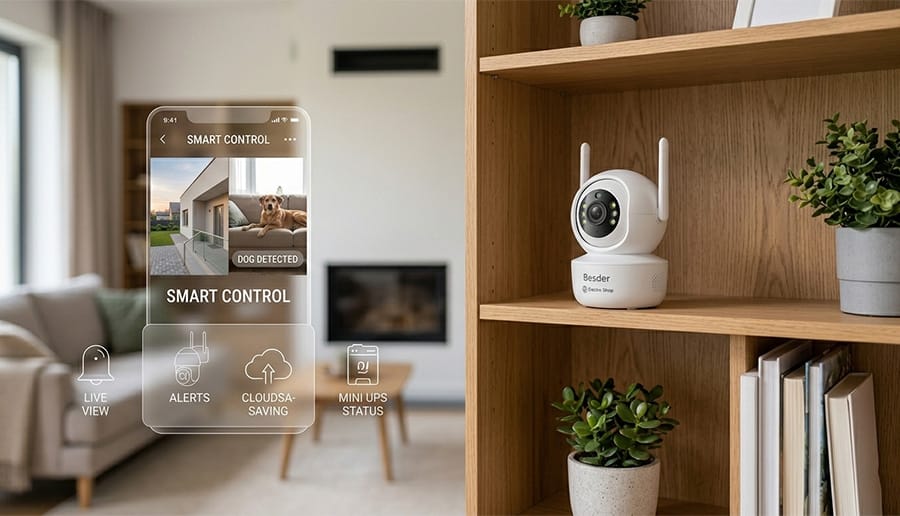
Which equipment to choose: IP or Wi-Fi?
For large enterprises and industrial facilities, complex wired IP systems are usually built. However, for private homes, apartments and small businesses, the ideal solution is steel. Wi-Fi cameras (in particular, the brand's popular line BESDER). They do not require destroying walls to run cables and quickly sync with the mobile app.
Key parameters when choosing a camera
Before purchasing, be sure to evaluate the following characteristics of the device:
- Image quality: Optimal choice — cameras with a resolution of 3MP to 8MP. This ensures the clarity of faces and license plates at a distance.
- Night mode: Models with IR illumination and LEDs allow you to see a detailed color image even in complete darkness.
- Intelligent detection: The human silhouette recognition feature minimizes false alerts on your phone due to the movement of animals or branches in the wind.
- Audio feedback: The built-in microphone and speaker allow you not only to hear the sound in the frame, but also to communicate with the visitor or warn an uninvited guest.
Comparison of different types of equipment
| Characteristic | Indoor Wi-Fi camera | Outdoor PTZ camera (pivoting) | Kit for 4 cameras (NVR) |
|---|---|---|---|
| Best suited for: | Apartments, offices, small offices | Courtyard of a private house, parking lot | Security around the entire perimeter buildings |
| Coverage area | Fixed angle (90°–110°) | 360° view thanks to the swivel mechanism | Maximum coverage due to the number of points |
| Moisture protection (IP66) | No (indoors only) | Yes (rain and frost resistant) | Yes (outdoor cameras included) |
| Where is the archive stored? | MicroSD memory card / Cloud | MicroSD memory card / Cloud | Recorder hard disk (HDD) |
| Connection complexity | Minimal (setup in 5 minutes) | Medium (requires wall mounting) | High (it is advisable to involve a specialist) |
Energy independence: work without light
Given the Ukrainian realities, the security system must work smoothly even during power outages. We recommend that you always power up your cameras and internet router via special Mini UPS or connect them to an uninterruptible power supply with a battery type LiFePO4. This guarantees uninterrupted operation. systems in offline mode mode.
Practical guide: answers to frequently asked questions (FAQ)
When choosing and installing a video surveillance system, customers often have practical questions. Based on technical facts and the experience of our installers, we have collected answers to the most popular of them:
1. What internet speed is required for stable camera operation?
To view real-time video without delays, the upload speed requirements from your router depend on the camera resolution:
- Camera 2 MP (Full HD): requires approximately 1.5–2 Mbps of stable output channel.
- Camera 4 MP–5 MP (2K): requires 3–4 Mbps per camera.
- 8 MP camera (4K): requires 6 to 10 Mbps.
Wrinkle: If you have limited traffic or weak internet at the facility, choose cameras that support a modern compression codec. H.265+. It reduces network load and saves up to 50% of memory card space without losing image quality.
2. How long does a memory card last for recording an archive?
Recording time depends on the card capacity and the selected mode (continuous recording or motion detection). Actual calculations for one 3MP camera using a modern compression codec:
| MicroSD card capacity | Permanent recording (24/7) | Motion sensor recording (average) |
|---|---|---|
| 32 GB | ~ 1.5–2 days | up to 5–7 days |
| 64 GB | ~ 3–4 days | up to 10–14 days |
| 128 GB | ~ 7–8 days | up to 20–30 days |
Once the memory card is full, the camera does not stop working — it automatically overwrites the oldest files with new ones (cyclic recording function).
3. How to protect a Wi-Fi camera from signal jamming and theft?
Attackers may try to steal the camera itself or use a radio signal “jammer.” To minimize these risks, follow these three rules:
- Installation height: Install outdoor cameras at a height of at least 3–3.5 meters so that they cannot be reached without a ladder.
- Archive duplication: Set up cloud storage recording via an app (such as iCSee or Tuyasmart). Even if the camera is damaged or stolen, the video of the incident will be instantly saved to your smartphone.
- Wired connection: Most quality Wi-Fi cameras (including models from BESDER) are additionally equipped with an Ethernet port (RJ45). If possible, connect the camera to the router using a twisted pair cable - this will completely eliminate the risk of any wireless interference.
User experience: what buyers say
Oleksandr, Dunaivtsi: “I installed a BESDER pan/tilt camera in the garage. I instantly receive a notification on my phone if someone enters the yard. The night vision is excellent — everything is clearly visible. Special thanks to the managers of Electro-Shop for their tips when choosing!”
Marina, Kyiv region: “I bought an indoor camera to see how the nanny gets along with the child. I set up the iCSee app myself in a couple of minutes. Now I feel calm at work. The sound is clear, the picture doesn’t freeze.”
Victor, business owner: “To control a small warehouse, the guys from Electro-Shop recommended a solution with recording to the cloud. It’s reliable: even if the camera is physically damaged, the entire archive is safe on the server. I recommend it!”
Ensuring the security of property has become much easier and more affordable today. In the store Electro-Shop We will help you choose a ready-made solution for your tasks and budget, provide detailed advice and a warranty on the equipment. Your safety is your peace of mind!