
Useful tips
Camera Installation Mistakes: TOP 7 Critical Installation Decisions


An incorrectly mounted camera rarely breaks down immediately - much more often it simply "doesn't see anything" at the right moment. In practice, it is camera installation errors are the reason why the system formally exists, but in a real situation it does not provide any benefit: faces cannot be read, car license plates are illuminated by headlights, and important areas remain out of the frame.
For a private house, apartment, warehouse or office correct installation of video surveillance — it's not just about mounting the housing to the wall. It's about angle, height, lighting, power, cable protection, distance to the object, and even how the camera reacts to winter, rain, and direct sunlight. The same model can work perfectly over a driveway and be almost useless over a gate if it's installed without calculation.
Most often, problems arise not because of expensive or cheap cameras, but because of the haste of the installer or the owner who chose the location "by eye". That is why before installation it is worth understanding, Where to hang an outdoor camera, how not to spoil camera angle, and why sometimes one bracket shifted by 30 cm solves more than an upgrade of the model itself.
Below are 7 critical decisions that most often lead to video surveillance system failure, as well as practical ways to avoid these mistakes without unnecessary costs.
Mistake #1: Choosing the wrong camera location
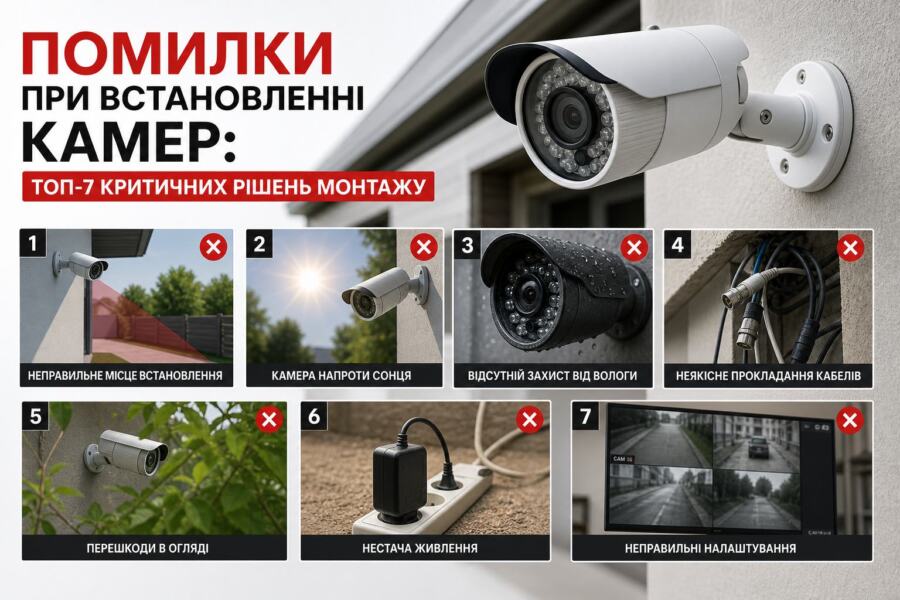
The most common cause of problems is that the camera is looking in the wrong direction. The user sees a facade, a beautiful picture on their phone, and thinks everything is fine. But during the incident, it turns out that the person's face is not in the frame, and the license plate is either missing or only partially readable.
When is it planned? Where to hang an outdoor camera, you should think not "where is it convenient to fix it", but "what task it should solve". If you need to monitor the gate, the camera should see the person even before he comes close. If you need to record the entrance, the camera should not be directed parallel to the wall - in this case, half of the frame will go into the "dead zone".
Practical example: A homeowner installed a camera under the eaves directly above the door. It would seem that the place is protected from the rain. But when a person approached, the camera could only see the top of their head. To control the entrance, the bracket had to be moved to another wall and changed camera angle so that both the door and the approach area are in the frame.
The universal rule is simple: the camera should not look "at a point", but at the area of predicted movement. This gives a margin per frame, allows you to get more information and makes the recording useful in real incidents.
Mistake #2: Ignoring the viewing angle and distance to the object
Even a good camera with a resolution 2 MP or 4 MP may not give the desired result if the focal length and mounting location are not chosen correctly. A wide angle is useful for a general view, but it "stretches" objects and reduces detail. Therefore, everything in the frame seems to be visible, but it is difficult to recognize a person or a number.
It is important to understand simple logic here: the wider camera angle, the more area it covers, but the less detail of a specific area. This is good for a yard, but not for face identification. If you need to see a face at a gate, the camera should be positioned so that the person is walking at a distance where their face takes up a sufficient part of the frame.
Another common mistake is to place the camera too high. A height of 4–5 meters can be useful for vandal protection, but from that point, people's faces are visible at a sharp angle. A height of about 2.5–3.2 m, if we are talking about an entrance group or an area near the door.
For critical areas, it is worth testing the image before final installation: temporarily attach the camera, check the frame day and night, walk a typical route of a person, see where exactly they fall into the frame. This is cheaper than later re-routing the cable, drilling new holes and changing the route.
.
Mistake #3: Not taking into account lighting, sun, and backlighting
Lighting is one of the most insidious reasons why video surveillance does not work as expected. During the day, a camera can show a great picture, but at night it is completely illuminated by a lamppost, car headlights or the sun reflecting off the glass. This is especially critical if the camera is facing the light.
A common situation in private homes: the camera is mounted above the entrance so that it looks outside, and behind the object is a bright sky-horizon or a white wall that reflects light. As a result, the system automatically compensates for the exposure, but faces become dark spots. For such conditions, you need not just an infrared mode, but a thoughtful arrangement without direct "backlight".
At night, not only the presence of illumination is important, but also its quality. If the IR illumination is reflected from a wall, cornice or glass, the frame is «clogged» with white light. That is why before installation, you should check whether shiny surfaces, gutters, glossy panels or door glass do not fall into the illumination zone.
If the camera has a built-in spotlight, it is worth considering the reaction of neighbors and the direction of the light. It is often better to use a separate, properly oriented lamp to monitor the yard than to rely only on the built-in backlight. This improves the quality of the recording without overloading the camera's automation.
Mistake #4: Weak or unstable power supply
Many users underestimate power, although it is it that determines the stability of the system. The camera can «hang», lose the network, periodically restart or distort the picture due to voltage drops. For an IP camera, this is critical, because unstable power is often disguised as «Internet problems» or «firmware failure».
If the power is supplied over a long cable, it is important to check for voltage losses. For lines on 12 V The drop on a thin wire becomes noticeable already at a considerable length. For PoE solutions, it is important not to exceed the permissible segment length and to use a high-quality pair without excessive connections and twists.
You should also think about redundancy. When the camera turns off along with the router when the lights go out, recording stops at the very moment when it is needed most. For a home or office, it is advisable to provide power through UPS or a small inverter backup to keep the camera, recording, and network equipment running at least 30–60 minutes after the network disappears.
Good practice: if the system contains several cameras, a recorder, a router and a switch, it is worth calculating the total consumption and leaving a minimum margin. 25–30%. This reduces the load on the power supply and extends the life of the equipment.
Mistake #5: Incorrect protection against moisture, dust and frost
An outdoor camera must withstand not only rain, but also wind, condensation, temperature changes, and dust. If the housing has an insufficient level of protection or the cable entry is made haphazardly, moisture will accumulate inside. First, this manifests itself in fogging of the glass, then in corrosion of contacts and failure of the electronics.
For outdoor installation, it is not enough to simply choose a camera labeled "for outdoor use." It is important that its installation is appropriate for the environment: a sealed entry, no open connections, and the correct angle of the bracket to prevent water from flowing into the installation site. If the cable is routed from above without a drain loop, water can enter the housing through the wire, even with normal plastic.
| Error type | Consequence | What to do |
| Installation without cable entry protection | Condensation, oxidation, short circuit | Use gland seals and a drain loop |
| Camera in direct rain without a visor | Fogging, spots on the picture | Place under protection or with a visor |
| Open connection on the facade | Moisture in the contacts, unstable operation | Protect the connection in a hermetic box |
| No frost consideration | Mechanical failure, battery degradation | Choose equipment with a working range -20…+50 °C or wider |
In the cold season, power supply units and backup batteries additionally suffer. If the system has a UPS or battery pack, it must also be placed in a place where the temperature does not fall below the permissible for a particular model. Otherwise, the backup is only on paper.
Mistake #6: Lack of a cable routing plan and protection against damage
The camera itself may be of high quality, but if the cable hangs out in the open, the entire system is vulnerable. It can be rubbed by doors, gnawed by animals, damaged by ultraviolet light, and sometimes simply pulled during cleaning or repair. This is especially true for places where the cable runs along the facade, fence, or in an area accessible to unauthorized people.
Proper installation of video surveillance always starts with the cable route: where it enters the building, how protected it is on the street, whether there is a reserve for service, whether it runs near power lines. If the cable is located near 220 V without separation, interference may occur, and in some cases, unwanted interference.
In practice, two principles work well: minimize the open area and do not make "tight" connections. A short margin in the mounting box allows you to service the camera without complete dismantling. And protecting the route in a corrugation, pipe or box significantly extends the service life of the system.
For multi-chamber systems, this is even more important: one poor-quality cable segment can create the impression that «the whole system is broken,» even though the problem is only in one damaged segment.
Mistake #7: No testing after installation
One of the most expensive mistakes is to assume that the system is ready after the last screw is screwed in. In fact, the camera must be tested in conditions close to real-life: during the day, at dusk, at night, with the backlight on, in the rain, when the gate is opened, and when people and cars are moving.
It is necessary to check not only the picture, but also the recording: whether the recorder is eating up fragments due to motion settings, whether the storage is full, whether access from the phone is working correctly, whether Wi-Fi is not lost if the camera is wireless. In many cases, the user notices the problem only after the first event, although it could have been detected at the test stage.
You should separately check whether the camera does not block the useful areas with its own housing or bracket. Sometimes a slight offset on 10–15 cm gives a much better result than further attempts to "tighten" the image with digital zoom.
Practice shows: after installation, it is worth saving 2–3 short test videos that show a face, a passage to the door, a license plate number, or another important object. This allows you to immediately understand whether the system is actually performing its task.
How to choose a location and set up the system without common mistakes
To avoid most problems, first determine the scenario: what exactly needs to be monitored - an entrance, gate, parking lot, corridor, stairwell, storage area or perimeter. This determines not only the camera model, but also the height, focus, direction and power supply method.
For convenience, there are a few practical rules to follow. If you need to identify people, the camera should operate at a moderate distance and not look too far down. If you need to survey a large area, a wide field of view is important. camera angle, but then for detailing it is better to provide another observation point. If the installation is outdoor, immediately think about sealing, cable and power reserve through UPS or other stabilizer.
For private homes, it is especially important not to skimp on the little things: a high-quality bracket, a proper gland, a normal power supply unit. 12 V or PoE components, cable protection from external influences. These elements often decide whether the system will work for years or whether it will need (Incomplete: max_output_tokens)