
Useful tips
How to protect video surveillance from hackers in 2026: engineer's tips


We deal with customer camera hacks every year. I've compiled the most effective protection methods that actually work in 2026.
Modern IP cameras have become much "smarter", but with this the number of cyberattacks has also increased. In 2026, hackers will attack not only large companies, but also ordinary private houses, shops, offices and summer houses. Many owners do not even suspect that their cameras can broadcast video to outsiders or be used in botnets.
The worst part is that most of the problems could have been easily avoided during the system setup phase. That is why proper protection of IP cameras has become as important today as installing an alarm system or reliable locks.
Why are cameras so easy to hack?
Most successful attacks occur not due to sophisticated hacking technologies, but due to typical mistakes made by owners:
- Factory passwords
- Open access from the Internet
- Outdated firmware
- Incorrect network organization
In many cases, owners do not even change the default admin/admin login after installing the system. Such cameras are found by automatic scanners in just a few minutes.
Another problem is cheap, no-name camera models that have weak security, are rarely updated, and often contain critical vulnerabilities out of the box.
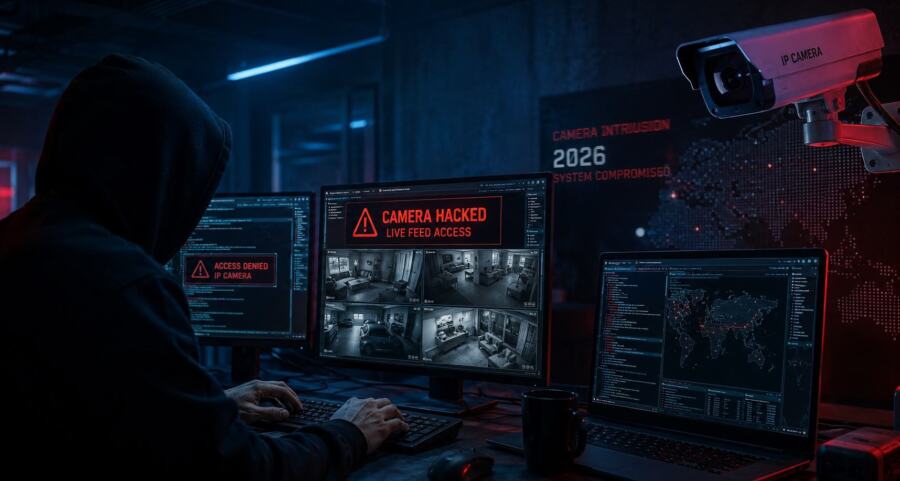
What risks arise after hacking cameras?
Many people think that's the most a hacker will see video from the camera. In reality, the consequences can be much more serious:
- Monitoring the home and owners' schedule
- Accessing your home network
- Identity theft
- Deleting or encrypting an archive
- Using cameras in DDoS attacks
- Substitute video or disabling recording
Particularly dangerous situations arise in business. If an attacker gains access to a store or office's video surveillance system, they can see staff movements, checkout areas, warehouses, and even confidential documents.
12 Real Ways to Secure Video Surveillance in 2026
1. Change all passwords to complex ones
Create a password of 16 characters or more, using uppercase and lowercase letters, numbers, and symbols. Each camera must have a unique password.
Don't use your date of birth, phone number, or simple combinations like 12345678. The best solution is a password manager.
2. Enable two-factor authentication (2FA)
The best way is through the Google Authenticator or Microsoft Authenticator app.
Even if the password is stolen, you will not be able to log in without a second confirmation.
3. Do not open cameras directly to the internet
The safest solution is to connect via VPN (WireGuard or OpenVPN). This is much more reliable than open ports.
Many systems still operate via port forwarding, which is one of the main reasons why cameras will be hacked in 2026.
4. Regularly update the firmware (Firmware)
Update the software of your cameras and DVR at least once every 1.5–2 months.
Manufacturers are constantly patching new vulnerabilities. If you don't update your firmware, your system will gradually become an easy target.
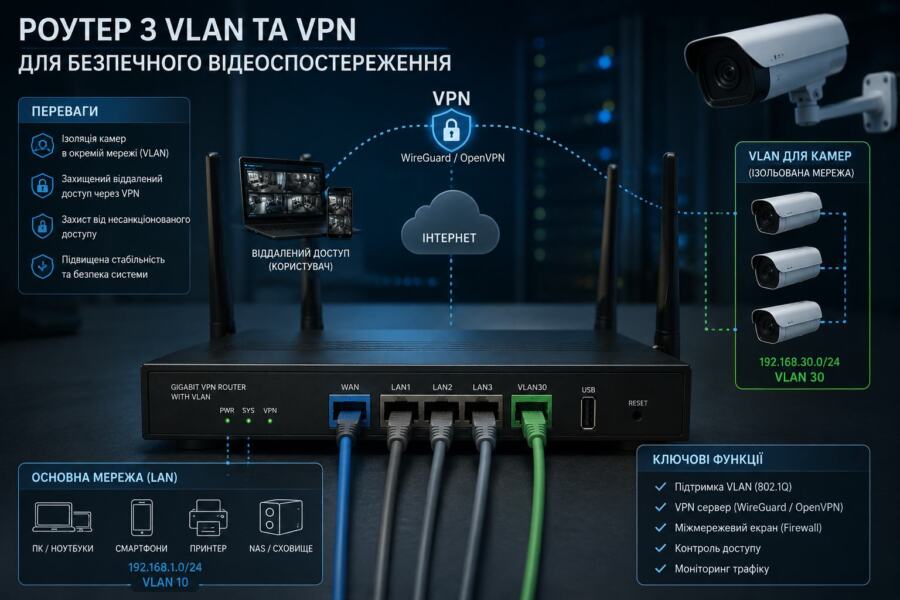
5. Isolate cameras in a separate network (VLAN)
This is one of the most powerful security methods. Even if a hacker breaks into your camera, they won't be able to access your main network.
I especially recommend VLANs for homes with smart homes, NAS storage, and work computers.
6. Disable dangerous features
Be sure to disable UPnP, Telnet, and DDNS.
UPnP automatically opens ports on the router, and Telnet has long been considered a dangerous protocol.
7. Choose reliable camera brands
In 2026, I recommend:
- Hikvision
- Dahua
- Uniview
- Axis
- Reolink
Avoid the cheapest no-name models. They often don't receive updates and have very weak protection.
8. Use only encrypted protocols
Make sure the cameras are working over HTTPS and RTSP over TLS.
Without encryption, data can be intercepted on a local network or over the Internet.
9. Set up local recording
It is better to store the archive on an HDD or NAS than to rely solely on the cloud.
A local archive provides faster access speed and less dependence on the Internet.
10. Monitor the system
Set up notifications for failed login attempts and regularly check for active connections.
If the camera suddenly starts working slower or places a heavy load on the network, this could be a signal of compromise.
11. Provide physical protection
Use vandal-resistant housings and place cameras in hard-to-reach places.
Often, attackers first try to physically damage or close the camera before breaking in.
12. Conduct regular security audits
Check the entire system every 3 months.
You need to check:
- Passwords
- Renewal
- Connection logs
- Router settings
- HDD or SSD status
Table: What protection methods are the most effective?
| Protection method | Efficiency level | Difficulty of setup |
|---|---|---|
| Complex passwords | High | Low |
| 2FA | Very high | Low |
| VPN | Maximum | Medium |
| VLANs | Maximum | High |
| Firmware update | High | Low |
Typical errors when setting up video surveillance
Over the years, I have seen hundreds of system misconfigurations. The most common mistakes owners make are:
- Same password on all devices
- Connecting cameras via Wi-Fi without encryption
- Using cheap routers
- Lack of backup power
- Archive storage only in the cloud
- Disabling updates "so nothing breaks"«
In fact, even an expensive camera does not guarantee security without proper network configuration.
Which router is better for secure video surveillance?
The router is the foundation of the entire security system. It is through it that all camera connections pass.
For modern video surveillance, I recommend routers with support for:
- VLANs
- VPN servers
- WPA3
- Firewall
- Access control
In 2026, MikroTik, TP-Link Omada, ASUS, and Ubiquiti are performing well.
How do you know if the camera has already been broken?
There are several indirect signs that may indicate a system compromise:
- The camera started to "slow down"«
- Reboots automatically
- Archive records disappeared
- Settings have changed
- Suspicious network activity
- Unknown users in the system
If you notice something like this, immediately change all passwords and disconnect the system from the Internet until a full check is performed.
Recommendations as an experienced specialist
- For a private house — optimally combine local recording + access via VPN.
- For the summer cottage — be sure to isolate cameras on a separate network and use 2FA.
- On a limited budget — it is better to install fewer cameras, but configure them correctly.
- Don't skimp on your router. — a modern router with VLAN support significantly increases the level of protection.
I also recommend ordering a professional system audit at least once a year. Often, even experienced users do not notice critical problems in the settings.
FAQ — frequently asked questions about security of video surveillance cameras
Can a camera be hacked without the internet?
Yes, but the risk is much lower. Most often, the danger arises through a local network or physical access to the device.
What is safer - the cloud or a local HDD?
The best solution is a combined option: local recording + cloud backup.
Are Wi-Fi cameras safe?
Yes, if you use WPA3, strong passwords, and up-to-date firmware.
Do I need to update the cameras if everything is working?
Yes. Most updates are released specifically to close vulnerabilities.
What minimum protection should each system have?
A complex password, 2FA, VPN, and regular updates.
In 2026 reliable video surveillance protection — This is not a one-time action, but an ongoing process. If done correctly, the risk of hacking is reduced tenfold.
A modern video surveillance system must not only be high-quality, but also properly protected at the network, software, and physical access levels.
The most important rule is to not wait for a problem. Most attacks can be prevented before a hacker even tries to access your cameras.
Need a professional audit or secure installation of a video surveillance system? Contact our team. We will configure the system according to all modern security standards of 2026 - with network isolation, VPN and maximum protection.
Have you checked the security of your cameras yet? Write in the comments which of these methods you consider the most important.